

Enabling and Configuring Oracle Fusion Human Resource Help Desk (HRHD)
If employees keep sending emails to HR for small questions, those emails can quickly turn into long conversations. An HR Help Desk can make this process much easier.
With Oracle Fusion Help Desk, employees can submit their questions or requests directly from Oracle Fusion. The request goes to the right support person, who can track it and resolve it.
In Oracle Fusion Cloud HCM, you can enable Help Desk from Setup and Maintenance. If you want to create an HR Help Desk for employee HR requests, select HR Service Requests as the Help Desk usage.
1. Enable the Help Desk Offering
First, you need to enable the Help Desk feature.
Go to:
Navigator → My Enterprise → Setup and Maintenance
Then follow these steps:
Go to Setup and Maintenance.

Open the Actions menu in the top right and choose Go to Offerings.

Find Help Desk in the list and select it.

Click Opt In Features.

Tick the Enable checkbox next to Help Desk.

Click the pencil (Edit) icon in the Features column.

Keep drilling into the feature settings until you land on Help Desk Usage.

Pick the usage type that matches what you're building:
HR Service Requests — for HR-related employee questions.
Internal Service Requests — for broader internal needs like IT or facilities

Select any other options relevant to your organization.

Click Save and Close, then Done.
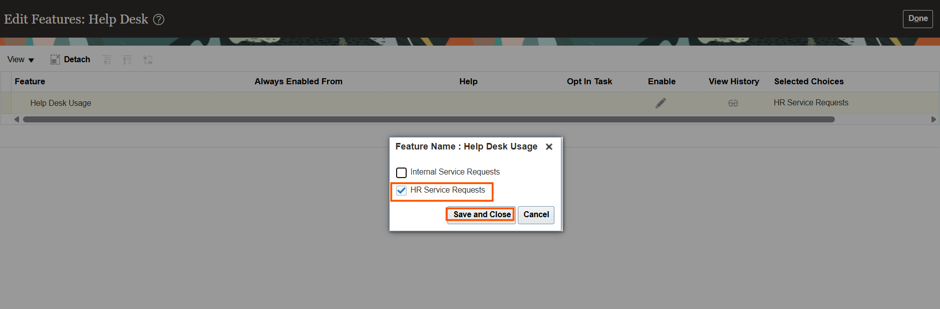
The screens may look slightly different in your Oracle environment. This can happen because different Oracle tenants may have different features enabled.
So, don't worry if your screen does not look exactly the same as another Oracle Help Desk screenshot.
2. Assign the Correct Security Roles
Enabling Help Desk is only the first step. Users also need the correct security roles to access and use Help Desk. This is a common reason why employees cannot see the Help Desk option after it has been enabled. The roles you need depend on what the user will do in Help Desk.
The roles required will depend on whether you are implementing an HR Help Desk or an Internal Help Desk.
HR Help Desk roles
Who they are | Role to assign |
Employees | Next Gen Human Resources Help Desk User |
Agents | Next Gen Human Resources Help Desk Agent |
Managers | Next Gen Human Resources Help Desk Manager |
Administrators | Next Gen Human Resources Help Desk Administrator |
Assign the Roles
After identifying the existing roles, assigning them to individuals becomes straightforward:
Regular employees get the User role.
People who actually answer the tickets get the Agent role.
Team leads or supervisors get the Manager role.
The person setting up the system gets the Administrator role.
From experience, do not give out Administrator access While it seems easy at first, it causes big problems later during security audits. Make sure people only get the access they need for their specific job—nothing more, nothing less.
3. What Changes Once It's Live
With the offering enabled and roles assigned, everyone gets exactly what they need:
Employees can raise a request and check on it later instead of chasing someone down over email.
Agents can see incoming requests, work on them, and talk to the employee directly inside the system.
Managers and Admins have the tools they need to track how things are going and keep the system running smoothly.
Before You Roll It Out to Everyone
Test everything with real accounts before you announce it to the whole company. This stops a flood of "it's not working" tickets on the first day. Log in as each type of user and check that everything works:
An employee can submit a request.
The employee can track their ticket.
An agent can pick up and work on a request.
A manager can access their special tools.
An administrator can reach the setup screens.
The HR Service Request options show up the way you expect.



Comments