

Configuring Questionnaires in Fusion HCM
In Oracle Fusion HCM, a Questionnaire is essentially an organized set of questions used to gather structured information. They are used across different HR processes like Recruitment, Performance Management, Onboarding and Offboarding.
Setting up a Questionnaire from scratch generally involves three main steps:
Configure Questions (Question Library): You first create the individual questions that you plan to reuse in different questionnaires.
Configure Questionnaire Template: This acts as the design blueprint. It controls the look and feels—like the order of sections/questions (sequential or random) and the page layout.
Configure the Questionnaire: This is the final step. You select a template, add the specific questions you want from your library, and define its basic details like name, folder, and who it's for.
Here is a simple step for creating the Questionnaire.
Step 1: Login

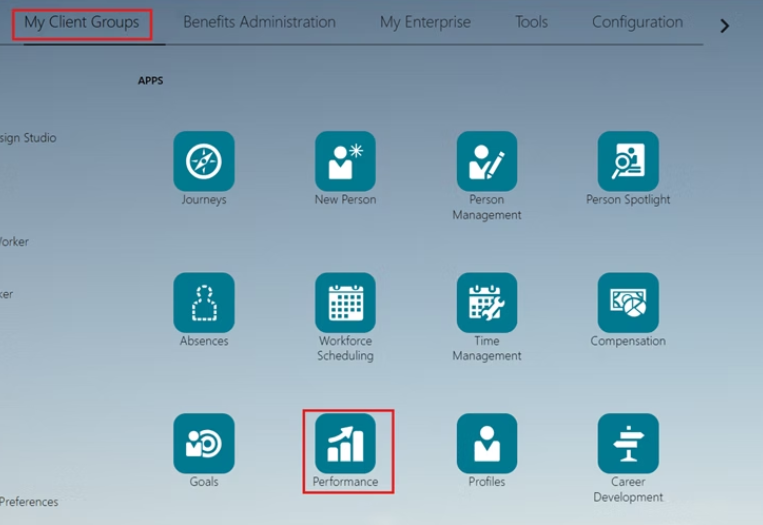
Step 2: Click on My Client Groups >> Click on Performance
Configure Questions (Question Library)
Step 3: Click on Questions

Step 4: Select Subscriber according you task

Step 5: Create a folder for questions (Click On + icons)

Step 6: Enter the folder name >> click on ok button

Step 7: Click on Create button

Step 8: Fill the all details >> click on Save and close button

Configure Questionnaire Template
Step 1: Click on Questionnaire Template

Step 2: Select Subscriber

Step 3: Click on Create bottom

Step 4: Fill all details and click on Next button

Step 5: Add section and question for section and click on next button

Step 6: Click on save and close Button

Configure the Questionnaire
Step 1: Click on Questionnaires

Step 2: Select Subscriber

Step 3: Click on Create Button

Step 3: Click on Create Button
Select your template and change status as active >> click on Save bottom

This process allows you to customize and standardize the data collection needed for various HR tasks across your organization.


Comments